
How to Pay Your Monthly Assessment Online on Western Alliance Bank
Follow these steps to set up your property and pay your monthly HOA assessment through Western Alliance Bank.
Step 1: Create an Account or Login
Go to 👉 https://pay.westernalliancebank.com/Home
Click Create Account if you are a first-time user, or Login if you already have an account.
Step 2: Go to “My Properties”
After logging in, click My Properties and then select Add Property.
Step 3: Enter Property Details
Fill in the details exactly as shown below (refer to the screenshot) to find out your Association ID, Account Number & Management Company Number, You would find this information at the bottom of your Invoice
or you can even call Western Alliance Bank at (844) 739-2331 and provide them your community name, address etc to ask for your details, or you can text Wozig.
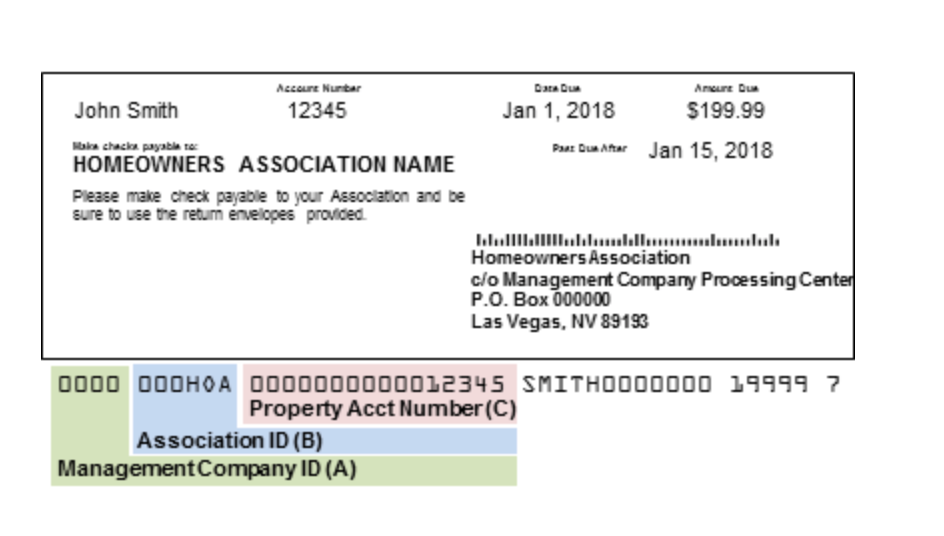
- Management Company ID (A):
7922
(This will always remain the same for Wozig) - Association ID (B): XXXXX
(Unique to Mason Circle Duets Condominium Association, Inc.) - Property Account Number (C): XXXXX
(Unique to your unit – text us if you need to confirm your Property Account Number)
You may also add an optional Property Nickname to help identify your unit if you manage multiple properties.
Step 4: Save Property
Click Add Property to save your information.
Once added, you will be able to make secure online payments for your monthly assessments.
Do you want me to format this as a blog-style post (like your earlier private team blog) with headings and embedded images, or keep it as a step-by-step guide PDF that you can share directly with homeowners?